

Can Procurement Managers Find Your Exact Product Without Calling You

A procurement manager rarely calls because they are curious. They call because something on your website, catalogue, or product data sheet failed to answer a basic buying question.
That question is usually simple:
Is this the exact product I need, and can I confidently shortlist it?
For technical products, “close enough” is not enough. A buyer may need the right grade, size, tolerance, pressure rating, load capacity, coating, voltage, connector, standard, certification, or compatible part number. If that detail is missing, buried, or unclear, your product may get skipped before your sales team even knows there was an enquiry.
This is why product findability matters. Not just online visibility. Not just a good-looking website. Findability means a procurement manager can reach the right product, verify the specification, compare it with alternatives, and take the next step without waiting for a phone call.

Procurement teams search differently from casual buyers
A consumer may search by brand, style, or price. A procurement manager often searches by requirement.
They may begin with a part number from an old invoice, a drawing reference, a tender specification, or a maintenance team’s note. Their search could include:
A model number
A size and material combination
A standard such as ISO, IS, DIN, ASTM, or EN
A performance rating
A replacement part reference
A drawing code
A product category and application
A spelling variation or typo, such as `enginering company`
This search behaviour changes what your product information must do.
A generic page that says “we supply high-quality industrial valves” is not enough. A buyer may need to know whether a valve is SS 316 or cast iron, whether it is flanged or threaded, whether it meets the required pressure class, and whether the datasheet can be attached to a procurement note.
If your site does not answer those questions, the buyer has two choices. Call you, or move to a supplier who has already published the information.
Many buyers will choose the second option, especially when they are preparing a comparison sheet or working against a tender deadline.
The real cost of making buyers call
Phone calls are not always a sign of strong interest. Sometimes they are a sign of friction.
A sales call may still be needed for pricing, availability, customisation, bulk quantities, or lead time. That is normal. But a buyer should not need to call just to confirm the basics.
When every enquiry starts with “Please send catalogue” or “Please confirm dimensions”, your team loses time on questions that your product content should already answer.
The hidden costs include:
Slower qualification of serious buyers
Repeated back-and-forth over the same specifications
Missed enquiries after working hours
Lower trust from buyers who want documentation first
More pressure on sales teams to explain standard items
Fewer products discovered beyond the most popular ones
For Manufacturing Companies, this problem becomes sharper when the catalogue is large. A buyer may be looking for one exact bearing type, conveyor component, cable gland, filter element, cutting tool, sensor, pump spare, or machined part. If they cannot filter and verify quickly, your catalogue size becomes a barrier instead of a strength.
What “exact product” means in procurement
An exact product is not just a product name. It is a match across the information a buyer needs to reduce risk.
For a procurement manager, an exact match may include:
Product detail | Why it matters |
Product code or model number | Helps match internal records, drawings, and previous purchases |
Technical specifications | Confirms performance and compatibility |
Material grade | Affects safety, durability, and compliance |
Dimensions | Prevents installation and fitment issues |
Standards and certifications | Supports audits, tenders, and regulated purchases |
Application suitability | Helps avoid wrong use in the field |
Downloads | Lets the buyer attach proof to internal approvals |
MOQ and packaging | Supports cost and stock planning |
Custom options | Shows whether the product can meet non-standard requirements |
If this information is scattered across PDFs, catalogue scans, WhatsApp messages, and old brochure pages, the buyer has to work too hard.
A strong product page gathers the decision-making information in one place.
Your product names may be blocking discovery
Product naming is one of the most common causes of poor findability.
Internal teams often use short names that make sense inside the business. Buyers may use different names. Maintenance teams may use a practical field term. Dealers may use brand references. Engineers may search by standard or specification.
For example, one product might be known as:
Hex bolt
Hex head screw
M10 x 50 bolt
High tensile bolt
Grade 8.8 fastener
DIN 931 bolt
Part number from an older purchase
If your product page uses only one of these terms, many buyers will miss it.
This does not mean stuffing every page with repeated keywords. It means writing like a real supplier who understands how the product is requested in the market.
A good product page can include:
A clear product title
Common alternate names
Standard references
Compatible part numbers where valid
Application terms
Material and grade details
Size range
Category placement
A buyer should be able to arrive from the term they know and still recognise the product they need.
Product filters should reflect buying decisions
A catalogue with hundreds or thousands of products needs filters. But the filters must match how buyers narrow choices.
Weak filters use broad categories only. Strong filters use real buying criteria.
For an industrial product supplier, useful filters may include:
Material
Size
Grade
Load capacity
Pressure rating
Temperature range
Voltage
Surface finish
Mounting type
Thread type
Connection type
Certification
Industry application
Availability status
The best filters depend on the product category. A pump catalogue needs different filters from a fastener catalogue. A sensor catalogue needs different attributes from a sheet metal component catalogue.
The mistake is treating every product page like a brochure. Procurement search is closer to technical matching than casual browsing.
If a buyer has to open 20 product pages to compare bore size, material, and rating, the catalogue is doing too little work.
PDFs help, but they should not carry the whole burden
Many companies still rely on downloadable catalogues as the main source of product information. PDFs are useful, especially for technical sheets, installation guides, safety instructions, certificates, and detailed drawings.
But PDFs should support the product page, not replace it.
If all key information lives only inside a 120-page catalogue, search engines and buyers may struggle to reach the exact item. A procurement manager may not want to download a large file on a slow connection just to check one model.
A better approach is:
Put the key product details on the web page.
Add a downloadable datasheet for documentation.
Link related products and variants.
Provide CAD files or drawings where relevant.
Keep revision numbers and dates clear on documents.
This gives buyers both speed and proof.
The web page helps them find and assess the product. The PDF helps them document and share it.
Specifications need structure, not paragraphs
Technical buyers scan. They look for the deciding detail.
A paragraph that says “Our heavy-duty couplings are available in various sizes and materials suitable for demanding industrial applications” does not help much.
A structured specification table does.
For example:
Attribute | Example information |
Product type | Flexible jaw coupling |
Material | Aluminium hub, polyurethane spider |
Bore range | 6 mm to 35 mm |
Torque range | Stated by model |
Temperature range | As per datasheet |
Mounting | Keyway or set screw |
Application | Pumps, motors, conveyors |
This format helps buyers confirm fit quickly. It also helps internal teams maintain product data consistently.
Use paragraphs for explanation. Use tables for specifications.
That small shift can reduce unnecessary calls and improve trust.
Search should handle messy input
Procurement search is rarely perfect. A buyer may paste text from an email, enter a partial model number, search with spaces removed, or use an old code.
Your website search should handle this reality.
Good search experiences support:
Partial part numbers
Spelling variations
Singular and plural terms
Alternate product names
Category suggestions
Filters after search
No-result pages that guide the buyer
A poor no-result page simply says “No products found.” A useful one suggests nearby categories, common terms, or a way to send the part number for matching.
Even if you cannot build advanced search immediately, you can still improve search results by regularly reviewing what buyers type and adding missing terms to product pages.
The buyer also needs confidence signals
Finding the product is only the first step. The buyer then asks, “Can I trust this supplier?”
Trust does not require long claims. It requires clear evidence.
Useful confidence signals include:
Product images that match the actual item
Datasheets with consistent formatting
Certification details where applicable
Clear company information
Industries served
Quality process overview
Warranty or replacement terms where relevant
Dispatch and packaging information
Ability to support bulk or repeat orders
Avoid vague statements such as “best quality” and “world-class service” unless you can support them with specifics.
A procurement manager does not need poetic copy. They need enough clarity to move your product into the shortlist.
Availability and lead time should be handled carefully
Not every company can show live stock. That is understandable, especially for made-to-order industrial products, custom parts, and catalogue items with variable demand.
Still, silence creates doubt.
If live stock is not possible, use practical signals:
Standard item
Made to order
Available against enquiry
Typical dispatch category
MOQ indication
Customisation available
Bulk order support
Be careful with exact promises unless your operations can meet them. A false delivery claim damages trust faster than no claim at all.
For India-wide supply, buyers often compare not only product fit but also dispatch reliability, packaging quality, tax documentation, and after-sales support. Product pages should make the buying path feel predictable.
Images must show what words cannot
Industrial product images are often treated as decoration. They should be treated as evidence.
A good product image helps a buyer understand:
Shape
Finish
Connection points
Scale
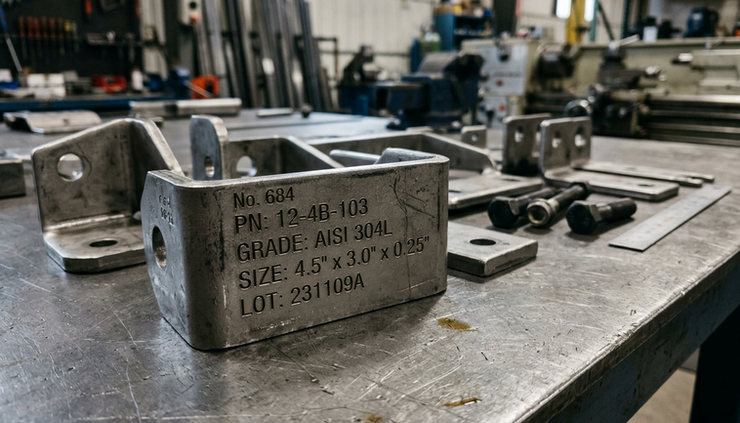
Label markings
Mounting details
Kit contents
Packaging
Use real product photos wherever possible. If variants look different, show those differences. If a product has critical markings, include a close-up.
Avoid using one generic image across many technical variants when appearance affects selection. That can create confusion and increase calls.
For complex products, add diagrams or labelled images. A labelled image can answer questions faster than a paragraph.
The internal data problem behind poor findability
Poor product findability often starts inside the company.
Sales may have one list. Production may have another. Accounts may use item codes. Dealers may use old names. The website may show only marketing-friendly names. Over time, the catalogue becomes inconsistent.
The solution is a product data system, even if it begins as a simple spreadsheet.
At minimum, each product should have:
Unique product code
Product name
Category
Short description
Technical specifications
Variant details
Images
Datasheet link
Standards or certifications
Related products
Replacement or compatible references
Status, such as active, discontinued, or custom
This becomes the base for your website, catalogues, dealer sheets, and sales responses. It also reduces internal confusion.
Clean product data saves time across sales, procurement support, production planning, and customer service.
A quick audit can reveal the gaps
You do not need a large project to find the biggest problems. Start with a simple test.
Pick ten products from your catalogue:
Three high-selling products
Three technical products with many variants
Two products buyers often ask questions about
Two products you want to sell more often
Now ask someone outside your sales team to find each product on your website using only a basic requirement or part number.
Track what happens.
Can they find the product in under two minutes?
Can they confirm the specification?
Can they download a datasheet?
Can they compare variants?
Can they understand the next step?
Do they need to call for basic details?
This test often reveals missing filters, unclear titles, weak search results, poor images, and incomplete specifications.
The goal is not perfection. The goal is to remove avoidable friction.
What a procurement-ready product page includes
A strong product page does not need to be complicated. It needs to be complete and clear.
Use this as a practical checklist:
Clear identification
Product name, code, category, alternate names, and key variant details.
Technical proof
Specifications, standards, dimensions, material, performance rating, and compatible references where valid.
Useful visuals
Real product photos, close-ups, drawings, and diagrams when needed.
Downloadable documents
Datasheets, catalogues, certificates, manuals, test reports, or CAD files where appropriate.
Buying context
MOQ, customisation options, packaging, availability category, and enquiry path.
Related choices
Variants, accessories, spares, replacements, and similar products.
Support for comparison
Tables, filters, and consistent attributes across the product category.
If your page covers these points, a buyer can do most of the early evaluation without calling.
Sales calls should begin later in the buying journey
The aim is not to remove human sales. Many industrial purchases still need discussion. Complex requirements, special pricing, project quantities, application checks, and custom manufacturing all benefit from expert support.
The point is to make the call more valuable.
Instead of spending the first call explaining what the product is, your team can discuss:
Quantity
Delivery schedule
Application fit
Custom requirements
Commercial terms
Documentation
Repeat order planning
That is a better use of everyone’s time.
When a buyer calls after reviewing a clear product page, the conversation starts with more trust and less confusion.
The takeaway
If a procurement manager cannot find your exact product without calling, the issue may not be demand. It may be product clarity.
Your catalogue should help buyers search by the terms they know, filter by the details that matter, verify specifications, download proof, and take the next step with confidence.
A clear product page does not replace your sales team. It prepares the buyer before the conversation begins.
The quieter test is the most useful one: choose an exact product, search for it like a buyer, and see whether the page answers enough to earn a shortlist. If it does, your product data is working. If it does not, every missing detail is a chance to win back serious enquiries.


Comments